
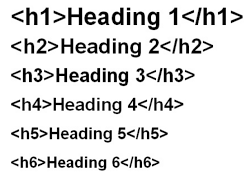
If you are into blogging, SEO, or content writing, you must have heard about heading h1 to h6 in html. These headings are not just for making the text big or small — they actually play a major role in Google ranking, readability, user experience, and helping search engines understand your content.
Most beginners get confused because they jump into blogging after watching social media videos about “earning money from websites,” but they start without proper knowledge. As a result, they struggle — they don’t understand SEO, they don’t know how to structure content, and they don’t know how to properly use heading h1 to h6 in html.
But don’t worry!
This guide is written in simple, clear English based on practical experience. By the end of this article, you will fully understand heading h1 to h6 in html — and you will be able to use them like a pro in your blog posts.
In this complete guide, you will learn:
- What is H1?
- What is H2?
- What is the purpose of H3?
- How to use heading h1 to h6 in html?
What Are heading h1 to h6 in html? — Simple Definition
Heading tags are a part of HTML that help Google and readers understand the structure of your content.
Think of it like a book:
- H1 = Book Title
- H2 = Chapter Names
- H3 = Topics inside the chapter
And H4, H5, H6 are deeper subtopics used when needed.
Example (HTML):
<h1>Book Title</h1>
<h2>Chapter 1</h2>
<h3>Topic 1.1</h3>
<h3>Topic 1.2</h3>
<h2>Chapter 2</h2>
Exactly like this, your blog post follows a hierarchy using H1 to H6.
What Is H1?
H1 is the main heading h1 to h6 in html of your page.
It tells Google and users what your page is about.
Rules:
- Only one H1 per page (best practice)
- Must include the main keyword naturally
- Should be clear, short, and specific
Good Example:
<h1>heading h1 to h6 in html: Complete Guide for Blogging & SEO</h1>
Mistakes to Avoid:
- Using multiple heading h1 to h6 in html
- Keyword stuffing
- Very long or confusing H1
What Is H2?
H2 headings are your main sections.
They divide the article into major parts.
Examples of H2 in this article:
- What is H1?
- What is H2?
- Importance of heading h1 to h6 in html
- Best example of heading structure
H2 headings help Google understand the major topics of your blog post.
What Is H3?
H3 is used inside an H2 section.
Example:
H2 → “Importance of heading h1 to h6 in html in SEO”
H3 → “Better user experience”
H3 → “Improved crawling & indexing”
H3 → “Higher chances of featured snippets”
Use H3 only when you have sub-topics under an H2.
heading h1 to h6 in html — Do You Really Need Them?
These are optional and used only when your content is very deep.
Example:
- H4 = Sub-topic inside H3
- H5 = Even more detailed sub-topic
- H6 = Rarely used
Most blog posts use only H1, H2, H3.
Why Are heading h1 to h6 in html Important for SEO?
- 1. Help Google Understand Your Content
Search engines read headings to understand your page structure and main topics.
- 2. Improve User Experience
Readers can quickly scan and find the information they need.
- 3. Better Crawling & Indexing
Clear structure helps Google crawl your page more efficiently.
- 4. Increase Chances of Getting Featured Snippets
Google often pulls concise answers from well-structured H2 or H3 headings.
- 5. Improve Accessibility
Screen readers use headings to help visually-impaired users navigate content.
Perfect heading h1 to h6 in html Structure Example
Let’s take a topic: “How to Take Care of Clothes”
Here’s a perfect structure:
<h1>How to Take Care of Clothes: Complete Guide</h1>

<h2>1. Washing Tips</h2>
<h3>• How to separate clothes</h3>
<h3>• Machine wash vs hand wash</h3>

<h2>2. Drying Methods</h2>
<h3>• Sunlight vs shade</h3>
<h4>– Tips for delicate fabrics</h4>

<h2>3. Ironing and Storage</h2>
This makes your article:
- Easy to read
- Easy for Google to understand
- Easy to rank
Best Practices for heading h1 to h6 in html
✔ Only one H1
✔ Use multiple H2 sections
✔ Use H3 inside H2
✔ Short, clear heading h1 to h6 in html
✔ Don’t style headings with tags — use CSS
✔ Add Table of Contents for long posts
✔ Maintain proper hierarchy (no jumping from H1 → H3)
✔ Make headings scan-friendly
✔ Use keywords naturally
✔ Keep mobile readability in mind
Common Mistakes
❌ Using heading h1 to h6 in html for font size
❌ Writing long paragraph-like headings
❌ Missing H1
❌ Too many H1s
❌ Irrelevant heading h1 to h6 in html
❌ Skipping hierarchy (H2 → H4 directly)
❌ Keyword stuffing
Content Length vs heading h1 to h6 in html Usage
| Content Length | Best Heading Pattern |
|---|---|
| 300–700 words | 1–2 H2 + few H3 |
| 800–1500 words | 2–4 H2 + strong H3 |
| 1500+ words | TOC + structured H2/H3 |
For long SEO articles, heading structure matters the most.
Useful Tools for Managing heading h1 to h6 in html
- Yoast SEO / RankMath → heading h1 to h6 in html suggestions
- Table of Contents Plugins → Auto-TOC
- Readability checkers → heading h1 to h6 in html structure analysis
- Google Search Console → Inspect indexing issues
Pro Tip: Make Your heading h1 to h6 in html Scan-Friendly
Most users skim content.
So write headings that instantly tell what the section contains.
Examples:
- “How to wash delicate clothes”
- “Best SEO practices for beginners”
- “Why H1 is important for ranking”
SEO-Friendly heading h1 to h6 in html Flow Example
H1: How to Start a Handbag Business

H2: Materials You Need
H3: Fabric Types
H3: Tools and Equipment

H2: Step-by-Step Making Process
H3: Cutting and Measuring
H3: Stitching

H2: Packaging Tips
H2: FAQs
H2: Conclusion
This flow is clean, SEO-friendly, and user-friendly.
FAQs
1. Should I use only one H1 per page?
Yes. Best SEO practice is to have only one H1.
2. Is adding a keyword to H1 important?
Yes — but naturally.
3. Can I use H3 without H2?
No. Always follow proper hierarchy.
4. Are headings a ranking factor?
They help Google understand content — indirectly boosting ranking.
5. What should be the ideal heading length?
Short, descriptive, and under 60–70 characters.
Conclusion
heading h1 to h6 in html are the backbone of your content.
They help:
- Google understand your page
- Users read more easily
- Improve ranking and user engagement
By using proper heading structure, your blog posts become professional, SEO-friendly, and far more readable.
If you want, I can also create perfect heading structure for your next article — just tell me your topic!