Claude AI has emerged as a standout assistant in 2026, largely because its interactions feel more grounded and “real” than typical chatbots. Founded by former OpenAI executives who brought deep industry expertise to Anthropic, Claude was developed with a unique framework called Constitutional AI. This approach ensures the system is inherently helpful and safe without resorting to robotic or overly restrictive responses.
Beyond simple Q&A, Claude functions like a highly capable colleague, excelling at complex reasoning, debugging code, and natural content creation. Whether you are a developer resolving 2 AM logic errors or a researcher analyzing massive documents, Claude’s ability to grasp deep context and “think through” problems alongside the user sets it apart as a sophisticated partner for meaningful work.
What is Claude AI and how it works?
Claude AI has solidified its reputation in 2026 as a premier “thinking” assistant, moving beyond simple chat to complex, autonomous problem-solving. Developed by Anthropic—a team composed of former OpenAI leaders—Claude is uniquely built on Constitutional AI. Unlike standard models that learn only from human feedback, Claude is trained with a literal “constitution” of ethical principles, allowing it to self-critique and align its responses with safety and helpfulness from the ground up.
Technically, Claude is a powerhouse driven by a massive 1 million token context window in its latest models, such as Claude 3.7 Sonnet and Claude 4.6 Opus. This allows the AI to “remember” and analyze entire codebases, dozens of research papers, or lengthy legal contracts in a single session—equivalent to roughly 750,000 words. Furthermore, it has evolved into Agentic AI; through tools like Claude Code, it doesn’t just suggest fixes but can actively navigate your computer, run terminal commands, and manage multi-step engineering tasks autonomously. For professionals in tech, law, and research, Claude offers a rare balance of deep reasoning and high-capacity memory, making it a true collaborative partner for high-stakes work.
Claude AI vs ChatGPT: Which is better in 2026?
the rivalry between Claude AI and ChatGPT has shifted from simple chat quality to specialized professional utility. Claude AI—led by Opus 4.6 and Sonnet 4.6—has established itself as the “Precision Engine” for technical and analytical work. Its massive 1 million token context window allows developers to process entire codebases and researchers to analyze 500-page reports without the AI losing track of fine details. Features like the Artifacts interface and Constitutional AI make it the reliable choice for high-stakes industries like law, finance, and engineering where factual accuracy is non-negotiable.
In contrast, ChatGPT (GPT-5.2) remains the ultimate “Creative Swiss Army Knife.” While Claude focuses on deep reasoning and text-heavy data, ChatGPT excels in versatility and multimedia. It integrates seamlessly with DALL-E for image generation, offers native video creation tools, and features advanced real-time voice interaction. It is the ideal partner for brainstorming, quick daily tasks, and creative projects that require switching between different types of media.
Quick Comparison: Which to Choose?
| Feature | Claude AI (Opus/Sonnet 4.6) | ChatGPT (GPT-5.2) |
| Best For | Coding, technical analysis, long documents. | Creative work, multimedia, daily tasks. |
| Context Memory | 1M Tokens (Elite for large projects). | High (Great for most standard tasks). |
| Special Tools | Artifacts, Claude Code (CLI). | DALL-E, Native Video, Advanced Voice. |
| Philosophy | Constitutional AI (Safety & Accuracy). | Versatility (Broad feature set & Apps). |
How to use Claude AI for free?
Claude AI remains highly accessible through its “Free Forever” plan, which provides users with access to the powerful Claude 3.7 Sonnet model. Getting started is as simple as signing up at Claude.ai or downloading the mobile app on Android or iOS. Unlike many free tiers that offer outdated versions, Claude’s free plan includes high-end features like Artifacts for real-time code previews, document analysis for large files, and integrated web search, making it a robust tool for students and hobbyists.
Claude 3.5 Sonnet vs GPT-4o comparison
the competition between Claude 3.5 Sonnet and GPT-4o has defined two distinct paths for AI utility: specialized precision versus versatile “Omni” performance. Claude 3.5 Sonnet has become the preferred choice for tasks requiring deep technical accuracy, consistently outperforming rivals in benchmarks like HumanEval and GPQA. Its ability to generate production-ready code on the first attempt—combined with a massive 200,000-token context window—makes it an elite tool for developers and researchers who need to analyze entire books or complex codebases in one go. The Artifacts UI further cements this by providing a dedicated workspace to visualize code and UI designs in real-time.
Is Claude AI available in my country?
As of March 2026, Anthropic has expanded its global footprint, and India remains a supported country for both free and Pro accounts. You can access it through the official website (Claude.ai) or the mobile apps available on the Google Play Store and Apple App Store.
Quick Access Guide:
- Web Access: Simply visit Claude.ai and sign up using your email or Google account.
- Mobile Apps: Both Android and iOS apps are available in the Indian regional stores.
- Language Support: It has excellent support for Indian languages, including Hindi and Roman Urdu, which could be very useful for your website projects.
- API Availability: If you are looking to integrate AI into your SEO tools or site, the Anthropic Console is also accessible in India for developers.
Claude AI for coding: A complete guide
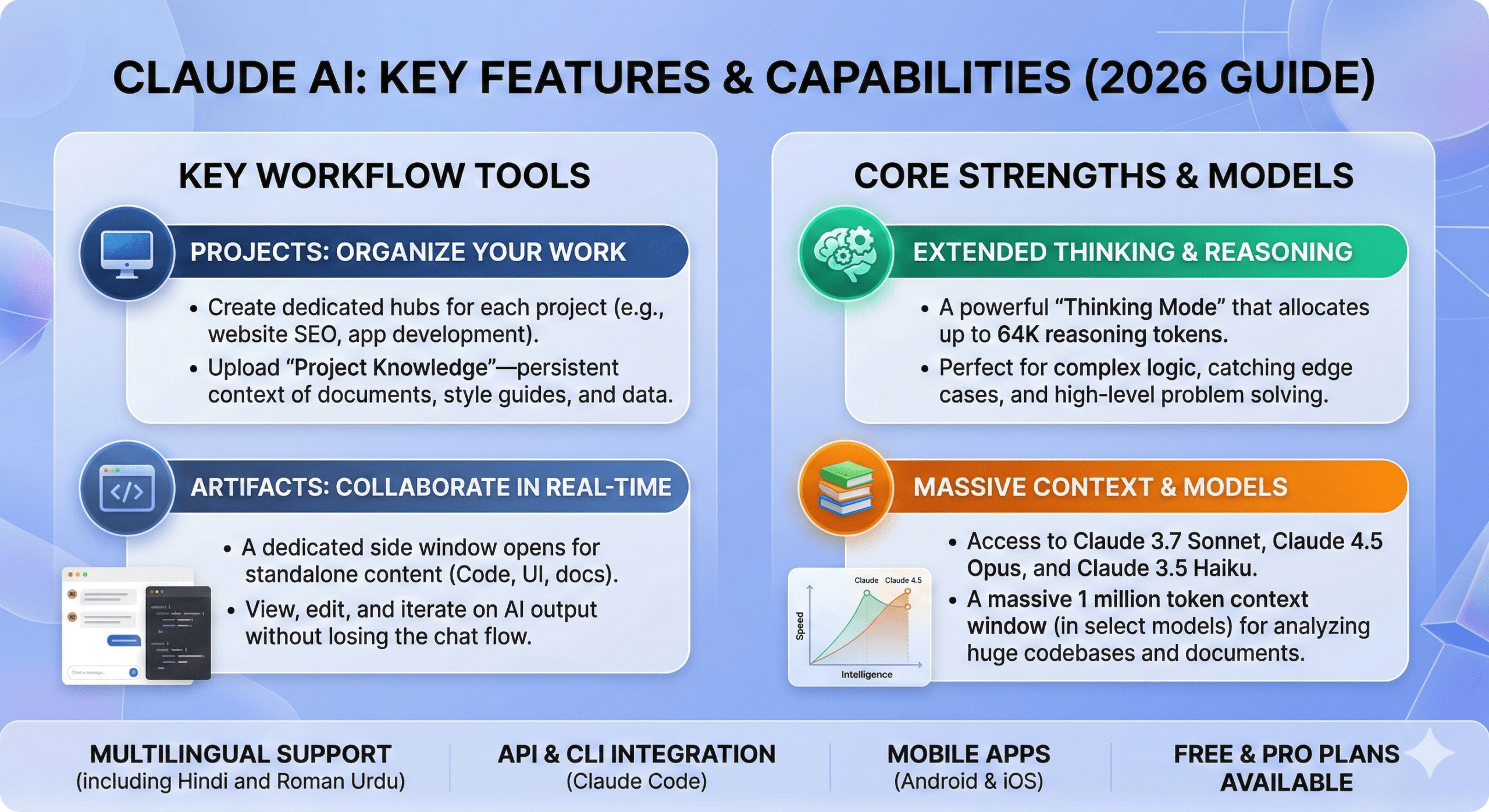
Claude AI has established itself as a premier tool for developers by offering a sophisticated “Extended Thinking” mode that allows the model to reason through complex logic and catch potential bugs before generating a final solution. In 2026, its capabilities have evolved from simple code snippets to full-scale “agentic” workflows, where tools like Claude Code (CLI) can directly interact with your local environment to run tests, refactor files, and manage Git commits. By utilizing features like Artifacts for real-time frontend previews and the Model Context Protocol (MCP) to connect with external data sources, Claude provides a seamless bridge between conceptual planning and production-ready implementation, making it an essential partner for modern software engineering and SEO-driven web development.
How to login and create an account on Claude.ai
To create an account and log in to Claude.ai, you can simply visit the official website or download the mobile app and choose between signing up with a Google account or a standard email address. Unlike many other platforms, Claude primarily uses a passwordless authentication system where a “Magic Link” or a six-digit verification code is sent directly to your inbox for each login session. During the initial setup, you will be required to provide a mobile phone number for a one-time SMS verification to ensure security and prevent bot activity. Once your identity is confirmed, you can enter your name, agree to the terms of service, and immediately start using the interface to manage your coding projects or website content across both desktop and mobile devices.
Claude AI API pricing and integration
Claude AI’s API pricing in 2026 is structured across three primary tiers designed to balance speed, intelligence, and cost. The flagship Claude Opus 4.6 is priced at $5.00 per 1M input tokens and $25.00 per 1M output tokens, serving as the premier choice for complex agentic tasks and high-level reasoning. The mid-tier workhorse, Claude Sonnet 4.6, offers a highly efficient balance for general development and SEO content at $3.00 per 1M input and $15.00 per 1M output tokens, while the budget-friendly Claude Haiku 4.5 remains the fastest option at just $1.00 per 1M input and $5.00 per 1M output tokens. Integration is handled through the Anthropic Console, where developers can generate secure API keys to connect Claude’s capabilities to their own platforms—such as your websites—using the Messages API. Advanced features like Prompt Caching now allow for up to a 90% cost reduction on repeated context, and the Model Context Protocol (MCP) enables Claude to interact directly with your local data and tools, creating a highly customized and automated workflow for modern web projects.
Claude AI mobile app download for Android and iOS
The official Claude AI mobile app is available for download on both Android and iOS devices, providing a seamless experience that syncs your chats across all platforms including the web. For Android users, the app can be installed directly from the Google Play Store by searching for “Claude by Anthropic,” while iOS and iPadOS users can find it in the Apple App Store under the same name. Once installed, the app allows you to engage with the latest models like Claude 3.7 Sonnet, utilize vision capabilities for real-time image analysis, and participate in multilingual conversations, making it a powerful on-the-go tool for managing your web projects and coding tasks.
Best Claude AI prompts for content writing
Effective Claude AI prompts for content writing in 2026 focus on “agentic” workflows, utilizing its Extended Thinking mode and XML tagging to produce human-like, SEO-optimized results. To get the best output, your prompts should always include a defined Role (e.g., “Senior SEO Editor”), Context (e.g., “Targeting the keyword ‘Namaz Rakat Guide’ for an Indian audience”), a specific Task, and Constraints (e.g., “Use short, punchy sentences and avoid generic transition words”). For long-form articles, the most successful strategy is to use prompt chaining—asking Claude to first generate a detailed outline and then writing the post section-by-section to ensure depth and accuracy. You can further enhance quality by providing few-shot examples of your preferred writing style wrapped in <example> tags, and using “positive constraints” like “Use active voice and a conversational tone” rather than simply listing what the AI should avoid.
Claude AI features: Artifacts and Projects explained
Claude AI features two major productivity tools, Artifacts and Projects, which transform the platform from a simple chatbot into a collaborative workspace. Artifacts are dedicated side windows that open automatically when Claude generates standalone content—such as code snippets, React components, single-page websites, SVG graphics, or Markdown documents—allowing you to view, edit, and iterate on these creations in real-time without losing the flow of your conversation. Meanwhile, Projects act as organized hubs where you can group related chats and upload a permanent “knowledge base” of documents, style guides, or codebases (up to 200,000 tokens). This persistent context ensures that Claude remembers your specific project requirements, like your SEO guidelines for namazrakatguide.com, across every new chat session within that project, significantly reducing the need to repeat instructions and saving your message limits for more complex tasks.
Is Claude AI safe and private for data?
Claude AI is built with enterprise-grade safety and privacy standards, ensuring that your data is protected through robust encryption and strict data usage policies. By default, Anthropic does not use data submitted through their API or by Team and Enterprise plan users to train their large language models, providing a secure environment for sensitive coding and business projects. For free and Pro tier users, the platform offers transparent privacy controls and safety guardrails designed to prevent the generation of harmful content while maintaining a high level of confidentiality. Furthermore, the 2026 updates include enhanced “Model Context Protocol” security, ensuring that when you connect Claude to your local files or databases, the data remains under your control and is only accessed to fulfill your specific requests.
In conclusion, Claude AI has positioned itself as an indispensable tool for developers and content creators in 2026 by blending high-level reasoning with practical, “agentic” features like Claude Code and Artifacts. Whether you are leveraging its sophisticated coding capabilities to build robust web architectures or utilizing its “Extended Thinking” mode to craft SEO-optimized content for sites like namazrakatguide.com, the platform offers a secure, private, and highly adaptive environment. By mastering its advanced prompting techniques and integrating its API into your professional workflow, you can significantly accelerate your production cycle while maintaining a high standard of quality across all your digital projects.
FAQs Claude AI: The Ultimate Guide to Features
Is Claude AI available in India?
Yes, Claude AI is fully available in India as of 2026. You can access it via the web at Claude.ai, through the official Android and iOS mobile apps, or by using the Anthropic API for development projects.
Is Claude AI free to use?
Claude offers a Free plan that gives you access to their most capable models with daily usage limits. For higher message caps, priority access during peak hours, and early access to new features like “Extended Thinking,” you can upgrade to Claude Pro.
How does Claude AI compare to ChatGPT for coding?
In 2026, many developers prefer Claude for coding due to its Artifacts feature, which provides live previews of frontend code, and its Extended Thinking mode, which allows the AI to catch logical errors more effectively than standard models. Its “Claude Code” CLI also offers a more integrated terminal experience for engineering.
Can Claude AI write in Hindi or Roman Urdu?
Absolutely. Claude has excellent multilingual capabilities and can generate high-quality content in Hindi and Roman Urdu. This makes it a perfect tool for managing regional sites like aiseohubtech.com, where cultural nuance and specific terminology are important.
What are Claude “Projects”?
Projects allow you to create a dedicated workspace for a specific task. You can upload “Project Knowledge”—such as your website’s SEO guidelines, previous articles, or technical documentation—and Claude will use that context for every chat within that project, ensuring consistent and relevant outputs.
Is my data safe with Claude?
Anthropic prioritizes safety and privacy. By default, data from API users and Enterprise/Team plans is not used to train their models. For personal users, Claude provides clear privacy settings to manage how your data is handled, ensuring a secure environment for your intellectual property.
AI Related Post